Cookie Crown
The application decides which view to show from a role stored in the browser. Test whether the server can safely trust that client-controlled claim.
Objective
- Inspect and edit a challenge cookie.
- Explain why authorization must be derived from server-trusted state.
Before you begin
Open /challenge/cookie. Preserve the separate pctf_session cookie that tracks overall progress.
Concepts
Cookies are sent by the browser with requests and can usually be changed by the person controlling that browser. A cookie is not trustworthy merely because the server originally set it.
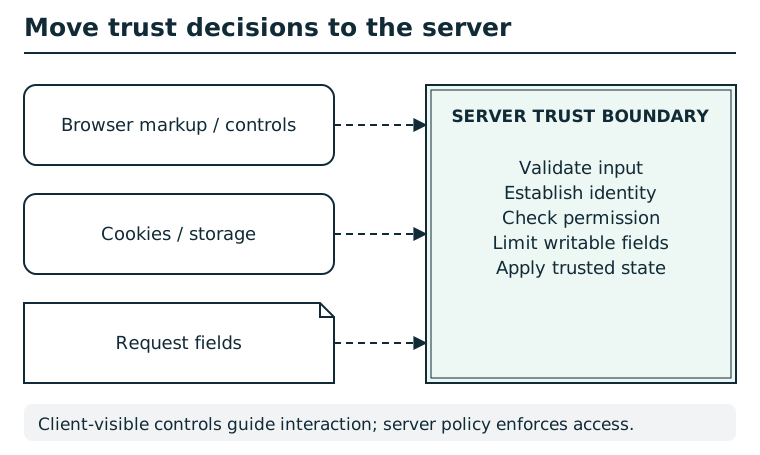
The browser can change local markup, storage, cookies, and request fields. Hiding a control or trusting a client-supplied role does not enforce permission. The server validates input, establishes identity, checks authorization, and limits writable fields before changing trusted state. A signed client value still needs correct verification, scope, and freshness checks.
Suggested tools
- Browser storage inspector: Displays and edits cookies for the current origin; an HTTP client with a Cookie header is an alternative.
Tool practice
Rehearse the worked tool exercise before using challenge data.
Find the challenge cookie in Storage/Application and retain its original value. After editing, check Network → the reloaded request → Request Headers → Cookie. Confirm that the edited value was sent and the progress cookie was preserved.
Investigation
Observe
Record the challenge's role cookie and the role shown by the page.
Form a hypothesis
What happens if the browser claims the conventional privileged role named by the page?
Test carefully
Change only the role cookie, reload once, and leave the progress cookie intact.
Progressive hints
Hint 1
Inspect cookies for the Pocket CTF origin.
Hint 2
The page names the conventional privileged role.
Hint 3
Replace the role value and reload the same route.
Troubleshooting and reset
If the page still shows the old role, confirm the cookie path is / and reload. Delete only role to restore the initial state.