False Identity
An archive accepts a modern asymmetric token and retains a legacy symmetric mode. Audit whether the verifier binds allowed algorithms to appropriate keys.
Objective
- Analyze a JWT's header, payload, signature, and key selection.
- Explain how algorithm confusion turns public verification data into a MAC key.
Before you begin
Complete Split Decision and retain the exact raw keyring bytes. Fetch the issued student token from /api/insane/token.
Concepts
RSA verification uses a public key, while HMAC authentication requires a secret shared key. A verifier must not let an untrusted token choose a mode that treats public RSA material as an HMAC secret.
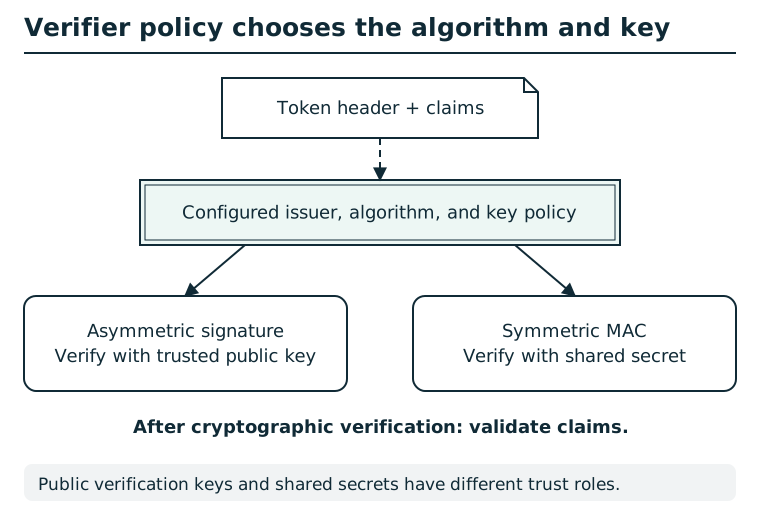
Token headers describe a proposed algorithm; they do not set verifier policy. An asymmetric signature is checked with the signer's trusted public key. A symmetric MAC is checked with a shared secret. Bind each allowed algorithm to the correct key type and trusted issuer, then validate audience, expiry, and application claims.
Suggested tools
- Python: Base64url-decode JSON, serialize compact JSON, and calculate HMAC-SHA-256 without sending tokens elsewhere.
Tool practice
Rehearse the worked tool exercise before using challenge data.
Base64url is a different alphabet from ordinary Base64. Decode header and payload as UTF-8 JSON, but treat the signature segment as binary. Preserve the exact saved verification-key bytes; pretty-printing that JSON changes bytes even if it preserves the same fields.
Investigation
Rehearse token serialization locally
A compact signed JWT has three dot-separated Base64url segments. The first two decode to JSON; the third decodes to signature or MAC bytes. The signed input is the ASCII text of the first two encoded segments, including their dot. Decoding a token does not verify it.
Practice encoding an unrelated JSON object:
import base64
import json

raw = json.dumps({"label": "lamp"}, separators=(",", ":")).encode()
segment = base64.urlsafe_b64encode(raw).rstrip(b"=").decode()
print(segment)  # eyJsYWJlbCI6ImxhbXAifQ
decoded = base64.urlsafe_b64decode(segment + "=" * (-len(segment) % 4))
print(json.loads(decoded))  # {'label': 'lamp'}
For an HMAC tool check, use hmac.new(b"practice-key", b"lamp", hashlib.sha256).digest() after importing hmac and hashlib. digest() returns 32 bytes; hexdigest() returns 64 printable hex characters. Encoding those 64 characters as the JWT signature is not equivalent to encoding the 32 raw MAC bytes. Recompute over the exact encoded segments you submit.
Observe
Decode the issued header and payload. Record alg, kid, role, and the exact key bytes returned by the first stage.
Form a hypothesis
Can an allowed legacy mode cause the verifier to use public verification material in the wrong cryptographic role?
Test carefully
Preserve the key identifier and compact token structure. Calculate locally, then submit one candidate as the documented form field.
Progressive hints
Hint 1
Decode header and payload as JSON and the signature as bytes. Compare the cryptographic roles of the accepted modes.
Hint 2
Compare the key type required by each accepted algorithm.
Hint 3
Preserve the issued token's compact serialization and key identifier.
Troubleshooting and reset
Base64url segments omit padding and use -/_. Do not parse and reformat the JWK before using its documented raw bytes. In-game hints reset with the session.