Service Credential
The station's diagnostic firmware and cloud configuration describe the same upload service from different sides. Determine whether authentication material was exposed in the diagnostic image and why its configured use makes the exposure broader than one device.
Objective
By completing this module, you will be able to:
- locate a credential among readable firmware strings;
- correlate a candidate value with structured configuration metadata; and
- explain why an embedded shared secret is difficult to contain and rotate.
Before you begin
Open Service Credential and download both artifacts. The firmware evidence is already a safe text export; do not run or modify it. Review File type and readable strings and JSON and JSON Lines if needed.
Concepts
Compiled firmware often retains readable paths, error messages, labels, and configuration constants. A label near a value can show how the program uses it, but a second artifact provides stronger evidence than appearance alone.
A secret compiled into firmware can be recovered from every distributed copy. If several devices share it, compromise of one image can expose the whole group. Manual rotation, broad scope, and reuse increase the recovery cost. Device-specific credentials held in protected storage reduce that shared blast radius.
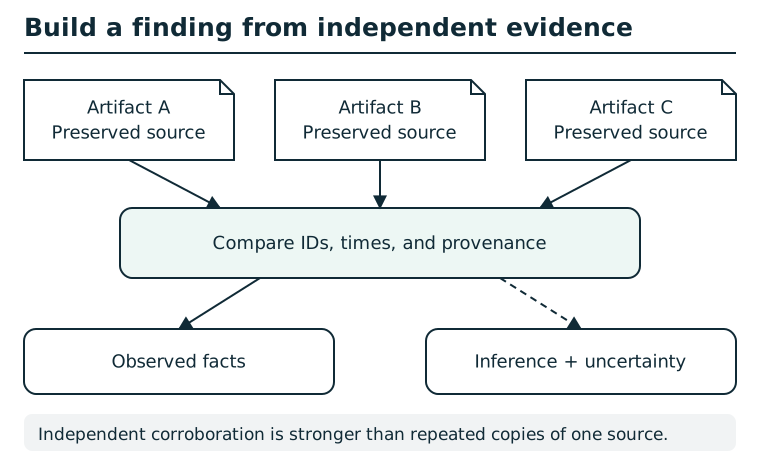
Preserve each artifact and record its source before comparing identifiers, timestamps, and provenance. A repeated value can link records, but shared origin or copied data may make evidence dependent. Separate observed facts from inferred relationships, note conflicting explanations, and state the limits of the resulting finding. Correlation alone does not prove causation.
Suggested tools
- Text editor or search tool: Search the firmware export for authentication, upload, token, password, secret, key, or authorization labels. An editor's search box is sufficient;
rgis an optional command-line alternative. - JSON viewer: Format the cloud configuration and inspect the complete diagnostic-upload object without losing field names or nesting.
Tool practice
Rehearse the worked tool exercise before using challenge data.
Use contextual search on the supplied firmware text export; then find the corresponding configuration object in a formatted JSON view. Retain the assignment label, value, and configuration path separately. Do not submit a field name in place of its assigned value.
Investigation
Observe
Separate ordinary firmware strings—versions, paths, errors, and metrics—from authentication-related strings. Record a candidate's label and nearby context, not just its value. In the configuration, inventory the diagnostic service's authentication type, credential source, scope, rotation model, and sharing group.
Form a hypothesis
Which firmware value is used to authenticate diagnostic uploads? Does the configuration name the same credential source? Is the value unique to one device, or does the policy indicate that multiple systems rely on a shared secret?
Test carefully
Search for several authentication terms rather than assuming the first uppercase string is a credential. Compare the candidate's label with the JSON field that names the configured token. Confirm that the service purpose and authentication method agree across both artifacts.
Submit the exposed value exactly as shown and select the weakness supported by the configuration. Avoid submitting a URL, certificate filename, station ID, or field name in place of the credential value.
Progressive hints
Hint 1
Search the firmware export for strings associated with authentication and the diagnostic upload function, not for sensor measurements.
Hint 2
In the JSON, focus on the diagnostic-upload object's authentication, token source, rotation, and sharing fields. Then find matching labels in the firmware.
Troubleshooting and reset
If the firmware export feels noisy, search for service-purpose words first and then inspect nearby lines. Preserve punctuation and capitalization when copying a credential. If the finding is rejected, confirm that you submitted the value, not its field name, and that the selected weakness matches the credential source and sharing model in the JSON.
Completing the finding reveals a seal; file it on the River Station incident board to record progress.